Released : Oct 30, 2009
Genre : Musical
Starcast : Salman Khan, Ajay Devgan, Asin, Om Puri
Desc :
They were childhood friends. But they had little in common except their family`s vague connection with music. While Arjun`s life was consumed by a passionate drive to get on stage and realize his grandfather`s unfulfilled dream, Mannu had little interest in his music tutor father`s instruments and was content with remaining a child at heart Arjun diligently pursued his dream, at the risk of running away from an uncle who was his only family in an unfamiliar land and roaming the streets of London before taking shelter in a music shop and priming himself until he`s ready to make his foray into the world of music and showmanship. But when he gets Mannu to London and makes him a part of the band, Arjun soon realizes he`s created the biggest threat and obstacle to his own ambitions.
Duration : 2hrs 33mins


Download (Password : pavan)


Use HJSplit to join all the above downloaded parts into a single file.Put them in a folder,open HJPLIT,select JOIN in it and select the 001 file n select a destination to save the joined single file.


Genre.................: Adventure | Children | Fantasy
Distributor...........: Eros Entertainment
Year..................: 2009
Cast..................: Amitabh Bachchan, Sanjay Dutt, Ritesh Deshmukh, Jacqueline Fernandez
Source................: Intellect Clever - Team ICtv
Format................: pDvD-Rip
Size..................: 673mb
Audio Format..........: mp3
Run TiME..............: 02:26:55
Resolution............: 608 x 288
Audio Languages.......: Hindi
Info..................: http://www.imdb.com/title/tt1227762/
Tagline...............: Mystery of the lamp
File Name..............: Alladin.2009.HiNDi.1CD.pDvD-Rip.XviD.Team-IcTv.By.SnowDoN.avi


Download


The BlueJ environment was developed as part of a university research project about teaching object-orientation to beginners. The system is being developed and maintained by a joint research group at Deakin University, Melbourne, Australia, and the University of Kent in Canterbury, UK. The project is supported by Sun Microsystems.

The aim of BlueJ is to provide an easy-to-use teaching environment for the Java language that facilitates the teaching of Java to first year students. Special emphasis has been placed on visualisation and interaction techniques to create a highly interactive environment that encourages experimentation and exploration.

BlueJ is based on the Blue system. Blue is an integrated teaching environment and language, developed at the University of Sydney and Monash University, Australia. BlueJ provides a Blue-like environment for the Java language.

The BlueJ project started at Monash University in Melbourne, and later split and migrated to its current locations.

BlueJ is implemented in Java, and regularly being tested on Solaris, Linux, Macintosh, and various Windows versions. It should run on all platforms supporting a recent Java virtual machine.


TuneUp Utilities 2010 can quickly make your Windows operating system faster, easier to use, and more secure. And all operations performed on the operating system are completely safe, because all changes are monitored by TuneUp Rescue Center and can be undone at any time. All TuneUp Utilities modules can be accessed through a common interface that is divided into six categories. In addition, the main window also has three general buttons in a dark gray bar to the right at the top of the window. Pressing the first button starts the TuneUp Rescue Center module. The second button starts the TuneUp Update Wizard, which can be used to update TuneUp Utilities 2009 to the latest version over the Internet. The last button provides help and settings that you can use to customize the software package to meet your needs.

The new Start page
TuneUp Utilities 2010 welcomes you with a completely redesigned Start page, which tells you about the status of your computer. If problems or nonoptimal settings are found, you are only a mouse-click away from resolving them. The Start page also tells you when new tips for increasing computer performance are available and warns you if maintenance tasks are not being taken care of automatically. The Start page also shows you whether new automatic startup programs have been added to Windows since the last time you ran TuneUp Utilities. You can decide whether these programs that start up automatically are really necessary.

TuneUp Speed Optimizer
Which settings slow your computer down? Which unnecessary services or programs are running in the background? Is your Internet connection optimally configured? TuneUp Speed Optimizer knows the answers to all these questions. It examines your entire system for bottlenecks, superfluous background programs, and incorrect settings. Great: with just one click you can carry out most optimizations very quickly. In addition, TuneUp Speed Optimizer provides suggestions for speeding up your system.

TuneUp Shortcut Cleaner
Cleaning up your working environment is tedious: removing invalid shortcuts from the Start menu, the Desktop, and the Quick Launch bar is very time-consuming. TuneUp ShortCut Cleaner now does the work for you. It checks whether all shortcuts are valid and removes the orphaned ones with just a click of a button. At the same time, empty folders are removed from the Start menu. TuneUp ShortCut Cleaner also checks frequently used programs and cleans up the list of recently opened files.

Support for the Opera browser
After hard disk defragmentation, which we introduced in TuneUp Utilities 2009, the feature most requested by customers was support for the Opera browser. TuneUp Utilities 2010 now also includes full support for Opera. Via several special Opera settings, TuneUp System Control now allows you to change the number of Speed Dial entries, conveniently choose your default search engine, and reenable fast backward and forward navigation. Internet optimization lets you optimize Opera's performance for your Internet connection. Free up disk space lets you delete the Opera cache.

TuneUp Styler
Now you can also change the Vista logo animation which appears just before logon. You can download a whole series of great animations from the TuneUp website. Or, if you prefer, you can choose your own personal image to display while Vista starts up. With Vista, you can also add your own images to Vista's logon screen: With just a few mouse clicks you can create a truly personal logon experience.

TuneUp Uninstall Manager
Redesigned from the ground up, TuneUp Install Manager now runs much faster and has a new, even more intuitive interface so that it is even easier to uninstall unnecessary programs. Unnecessary programs often are forgotten because they were installed a long time ago and then not used. TuneUp Utilities 2009 shows you a list of programs not used for a long time so that you can target for uninstallation those applications that use valuable disk space and in certain circumstances even slow your system down.

TuneUp StartUp Manager
A smooth-running system results when there are no unnecessary autostart applications. The improved TuneUp Startup Manager organizes your programs into groups and provides clear explanations to make it easier for you to identify those programs that are not needed.New automatic startup programs are now highlighted so that you can disable unwanted entries more easily. System start tasks are now also listed in TuneUp StartUp Manager In Vista, in particular, scheduled tasks are used in place of autostart entries.

Free up disk space
The already rapid display of disk space to be freed up is now even faster on NTFS drives. And now it is so easy to delete even more unnecessary files, like the backup files for the first Windows Vista service pack and the Opera and Safari caches. The second "Free up disk space" module that helps you turn off Windows functions that use excessive disk space has also been enhanced. The Windows Search index can now be disabled and deleted with a single click. This makes particular sense if you are already using a different search engine. In addition, TuneUp Disk Space Explorer now runs faster and no longer requires that an entire drive be analyzed. You can now specify that only those folders be analyzed that you are really interested in.

Lots more improvements
Along with the totally new features, there are a series of improvements that are not immediately visible. There are small improvements like Tooltips in the main window, a substantial increase in the number of problems that can be found byTuneUp Registry Cleaner, and better progress feedback from TuneUp Drive Defrag. But there are also big improvements "under the hood". Two good examples are a completely reworked installation program and significant improvements in our update technology.


Download

Serial : N1YD6Q-6JP6QP-2JN2MH-05JJVV-M3Q5T3-APTWNR


LimeWire is the world's most popular peer-to-peer file-sharing program. It is open standard software running on an open protocol, free for the public to use. LimeWire allows you to share any file such as .mp3, .avi, jpg, tiff, etc., allows you to search for multiple files at the same time, available in several different languages, and is most famous for its ease-of-use and cross-platform compatibility. With over 70 million unique monthly users, the software is downloaded hundreds of thousands of times every day and boasts millions of active users at any given moment.

LimeWire uses the BitTorrent protocol and the Gnutella network to provide an unparalleled searches and download speed to the user. Limewire is written in Java, and will run on Windows, Macintosh, Linux, Solaris, and other computing platforms. As always, LimeWire takes the security of its users very seriously and will never bundle spyware, adware, or viruses.

1. NO BUNDLED SOFTWARE OF ANY KIND! No spyware. No adware. Guaranteed.
2. Faster network connections. Using new "UDP Host Caches", LimeWire starts up and connects faster then ever before!
3. Universal Plug 'N Play. UPnP support allows LimeWire to find more search results and have faster downloads.
4. iTunes Integration. Windows users can now take advantage of LimeWire's iTunes integration.
5. Firewall to Firewall Transfers. Since about 60% of users are currently firewalled, this feature greatly increases the amount of content on the network.
6. Creative Commons Integration. LimeWire now recognizes OGGs and MP3s licensed under a Creative Commons License.
7. "What's New?" feature. Users can browse the network for the most recent content additions.
8. Search drill down results. Searches in LimeWire now immediately display the artists, albums and other information that fully describes files.
9. Proxy support. Users can now use web proxies to route their to protect their identity.
10. Support for International searches and International groups. Users can now search in any language, and LimeWire ensures that a user will be connected to other users with their own language to aide international users to receive search results in their native language and to find content from sources that are close to home.

LimeWire still has the following great features:

• Ease of use - just install, run, and search
• Ability to search by artist, title, genre, or other metainformation
• Elegant multiple search tabbed interface
• "Swarm" downloads from multiple hosts help you get files faster
• iTunes integration for Mac and Windows users
• Unique "ultrapeer" technology reduces bandwidth requirements for most users
• Integrated chat
• Directly connect to a computer
• Browse host feature--even works through firewalls
• Added Bitzi metadata lookup
• International versions: Now available in many new languages
• Connects to the network using GWebCache, a distributed connection system
• Automatic local network searches for lightning-fast downloads
• Support for MAGNET links that allow you to click on web page links that access Gnutella

New features:

Video support to watch a file in LimeWire for Windows and Mac OS X Snow Leopard. If LimeWire is unable to play due to a missing codec, your default system video player loads.
Inadvertent file sharing updates to ensure users understand what is shared.
Uploads and downloads appear in the transfer tray.
The transfer tray is automatically hidden by default when there aren't any transfers; you can change the setting in Options.
Added a nubbin to the transfer tray (a nubbin is the little thing you select to drag).
Check downloads to see whether it is dangerous before previewing.
Hide some file types by default associated with spam.
Search suggestions based on files from Friends are stored in database now, which reduces the memory footprint for large libraries of your friends.
Improvements in search suggestions from Friends based on what files they share with you.
Improvements in the way search results are sorted by relevance.
Displaying the LimeWire Store button only in locations where you can use the LimeWire Store.
File information/properties dialog box is redesigned.
Select different language in the View drop down menu.
Update to the Options.


TrackList :

1. LAST CHRISTMAS
2. CHRISTMASES WHEN YOU WERE MINE
3. SANTA BABY
4. SILENT NIGHT
5. CHRISTMAS MUST BE SOMETHING MORE
6. WHITE CHRISTMAS


Boost Windows is a revolutionary system booster. Unlike other similar software, they may require you know much knowledge of computer like registry editor, system configuration, and you may have to take the risk of damaging your system. With Boost Windows , you can complete the system optimization in a few “Next” clicks. Your Windows will be fine-tuned to a perfect status – like it was just completely reinstalled with all updates, fast, reliable, and safe.

Features:
Increase CPU cache Optimize system cache Speed up system startup and shutdown Clean temporary files Close non-essential services Improve graphics performance Speed up Start Menu Turn on Auto-Defrag Clear invalid installations Speedup web page access


Download


Launch Your Favorite Applications Faster
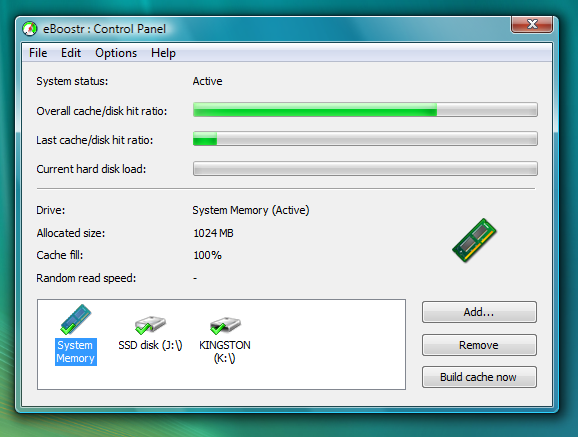
The more often you use a particular application, the faster it’ll perform. eBoostr gathers statistics on what applications you use and how often, optimizing their performance by pre-caching their files and data and allowing faster access speed and reduced delays.


Boot and Work Faster

eBoostr makes Windows load faster, significantly reducing the time your computer needs to boot.


No Hardware Upgrades

No need to disassemble your PC in order to upgrade its performance. eBoostr gives your PC a noticeable performance boost without costly hardwa
re upgrades. Just plug one or more flash memory drives, install eBoostr and say “Yes” to speed up your computer.

Utilize Available RAM Better

eBoostr features a SuperFetch-like solution and makes use of the otherwise wasted free RAM to store frequently accessed files and data. Every time you launch you favorite application, it’ll load much faster because of the preloaded data in RAM. If your computer has over a gigabyte of memory, you’ll see a significant increase in speed and responsiveness.

Laptops Benefit More
Speed up your laptops even more! Upgrading a laptop is difficult and costly, but not with eBoostr. Notebook hard drives are slower than their desktop counterparts, thus they benefit more from the use of flash memory with eBoostr and reduced hard drive activities.


Save Battery Power
Work longer with a battery. Less hard drive access results in reduced power consumption, which leads to improved battery life. Work faster and longer on your Windows XP laptop with eBoostr.


All Previous Windows 7 Transformation packs supports only XP but this latest release supports vista as well as XP and 2003.

Windows 7 Transformation Pack aka Seven Transformation Pack will transform your entire user interface, including a 7-themed Boot Screen, Welcome Screen, and Visual Style, as well as new icons, wallpapers, and more. The latest version is 3.1 released on September 25th, 2009

Transformation Pack Features:

1. Boot screen
2. Welcome Screen / Logon Screen
3. New msstyles files (visual styles)
4. New desktop and file icons
5. New toolbar icons
6. Progress Dialogs
7. Sounds scheme
8. System Tray icons
9. New Wallpapers
10. Some Windows 7’s popular features
11. And much more


Description:

CCleaner is a freeware system optimization, privacy and cleaning tool. It removes unused files from your system - allowing Windows to run faster and freeing up valuable hard disk space. It also cleans traces of your online activities such as your Internet history. Additionally it contains a fully featured registry cleaner. But the best part is that it's fast (normally taking less than a second to run) and contains NO Spyware or Adware!

Cleans the following:

* Internet Explorer
* Firefox
* Google Chrome
* Opera
* Safari
* Windows - Recycle Bin, Recent Documents, Temporary files and Log files.
* Registry cleaner
* Third-party applications
* 100% Spyware FREE

Technical:

Title: CCleaner 2.25.1025
Filename: ccsetup225.exe
File size: 3.16MB (3,310,608 bytes)
Requirements: Windows (All Versions)
Languages: en-US
License: Freeware
Date added: October 26, 2009
Author: Piriform
Homepage: www.ccleaner.com
MD5 Checksum: F5E50C87F6A8D9521013C6626D30F984

Change Log;

- Improved Windows 7 jump list cleaning.
- Improved Windows 7 thumbnail cache cleaning.
- Added support for Windows Server 2008 R2.
- Improved 64-bit support and performance.
- Fixed issue with Windows 7 task scheduler.
- Fixed issue with Startup tool, displaying incorrect folder contents.
- Added support for AVG Antivirus 9.0.
- Added support for ExcludeKey in INI files.
- Improved support for wildcards and RECURSE/REMOVESELF.
- Fixed minor GUI bugs in non-English versions.
- Fixed minor GUI usability issues.
- Improved input validation.
- Lots of minor bugs fixed.


Welcome

Hieee
Welcome To My Blog
Plz Comment If U Like Anything
Enjoy n Keep Smiling =)

Comment Box

Search Blog

Clock

My Muzic Playlist